Troubleshooting · For everyone
Common questions
Troubleshooting and support: start with the record and the message; help. This is chapter 41 of the NormaQMS User Guide.
Start with the record and the message
If a save or transition is refused, read the error and the record's checklist before retrying. Check that the page still represents the latest state. Another person may have acted since you opened it. A disabled control, missing control, and failed submit can have different causes.
| Symptom | Check and response |
|---|---|
| Organization or record not found | Confirm signed-in email, organization, unit membership, and external-grant scope; clear filters before recreating anything |
| Module missing from sidebar | Check More, personal pins, roles, and plan access; ask the administrator if access is needed |
| Locked module after payment | Reload and inspect Billing; provide support the organization and purchase context if it persists |
| Signature rejected | Check password, named approver, current revision, and decision meaning; an author cannot approve their own revision |
| File replacement blocked | A signature or lifecycle state may have frozen the revision; create the next revision for changed content |
| Send for review unavailable | Attach the file and add at least one approver |
| Mark approved or Make effective refused | Check every required approval and the user's authority; one missing or negative approval blocks the gate |
| Document review due unexpectedly | Check effective date, review interval, and latest periodic review; finish any open revision |
| Training changed to Due | Inspect the new effective revision and training-impact decision; complete the current requirement |
| A current training count differs by user | Compare department visibility, active people, requirements, and report definitions |
| Calibration date did not advance | Fail does not advance last-good date; inspect the result, date, and interval |
| NC will not close | Disposition, rework or repair verification, or CAPA decision is missing |
| CAPA remains open after actions finish | Record implementation and Verify by, then perform effectiveness verification |
| CAPA reopened after verification | Not effective intentionally returns it to In progress; record the next implementation and check |
| Production release blocked after reinspection | A Fail blocks until a nonconformance raised from that row is Closed; a later Pass does not cover it |
| Certificate recorded but the person is still refused | The qualification is Pending acceptance, expired, revoked, or not tagged to the Traveler qualification |
| Tablet refuses a sign-off | Read the message: hold, qualification, missing check, failed characteristic, gage, or count; chapter 21 lists each with its way out |
| Job cannot be released in Traveler | The router was withdrawn, or no router is released; cancel and recreate on the current router |
| Inspection plan will not release | Check product reference, revision, and at least one characteristic |
| Change will not submit or approve | Check all impact domains and notes, implementation plan, and effectivity |
| Complaint or event will not close | Follow its specific checklist; check reportability reference or exclusive notification alternatives |
| Management review will not close | Populate every input area and decisions; verify seeded text was actually reviewed |
| Import count differs from pasted rows | Inspect errors and duplicate rows defaulted to Skip; only eligible write actions count |
| Deployment or update refused | Check open revisions, stale preview, required variables, pack publication, and practice access |
| Supplier or auditor cannot enter | Match invitation email, acceptance, expiry, revocation, and the correct external portal |
| CSV appears empty | Clear filters, confirm the selected register, and review the pack README for omitted modules |
| Unsaved draft did not return | Recovery is limited to supported forms, browser storage, and seven days; files and passwords are excluded |
| Chain does not verify | Preserve the reference, exported evidence, and error; escalate before relying on that chain |
Help
Open Help for searchable module, record, account, billing, and troubleshooting articles. The public Help area and in-app Help can provide the same topic content in different navigation contexts. Use the article title or support topic identifier when available.
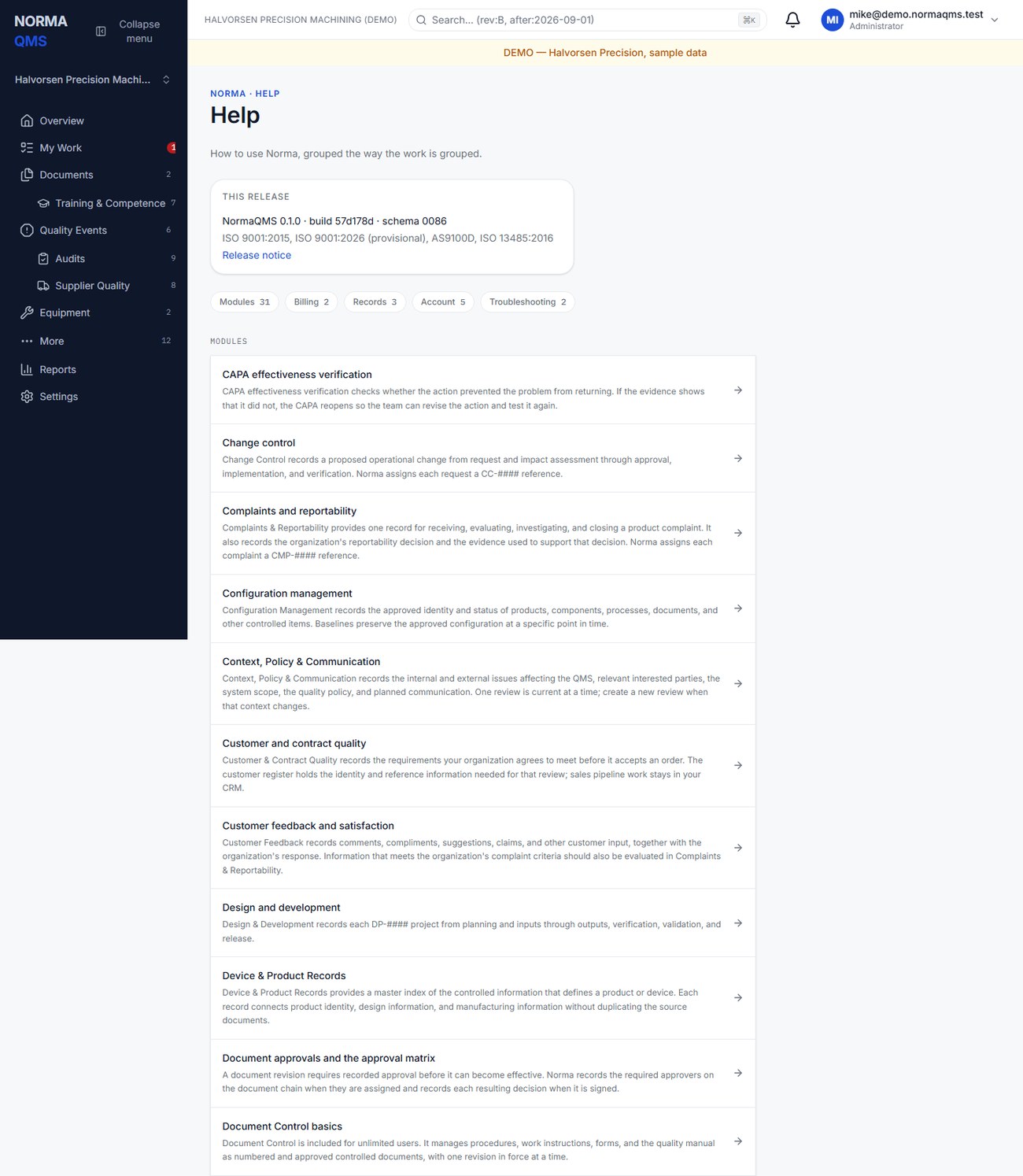
For a workflow question, open the relevant Help article from the profile menu. The article explains the task, the surrounding workflow, and the related modules. If an action produces an error, record the module, record reference, action attempted, exact error text, approximate time, browser, and whether the issue affects one user or several. Note what you expected and what happened.
The public site also includes product information, account entry points, Help, educational blog articles, verification, and the token-protected Passport. Educational articles do not change your shop's approved instructions or create records in its QMS.
In the user guide
This article is chapter 41, "Troubleshooting and support", of the NormaQMS User Guide (NORMA-UG-001), which is under Help > User guide. Chapter numbers in the text refer to that guide.