Modules · For the quality manager
Cost of quality: what quality costs your shop
Open: Cost of Quality, the first row of the sidebar for those who can see it. Read: Quality Manager, Executive / Top Management, or an administrator. Change: Quality Manager or administrator. Purpose: state what quality cost the shop in a calendar quarter, by the four standard categories, and set it against the same quarter a year earlier. Every dollar comes from a record you can open, or from an estimate someone typed, and the page says which. Cost of quality is not a paid module; every organization has it.
Who can see and change dollar figures
| Action | Who |
|---|---|
| Open Cost of Quality, its customer debits and owner's pages; see What this cost on a nonconformance, complaint or containment campaign; download the cost lines | Quality Manager, Executive / Top Management, or an administrator (the owner is one) |
| Add or remove a cost line, Work out cost, record a customer debit and change its status, ask a supplier for payback, change Settings and estimates, issue the owner's page | Quality Manager or an administrator |
| Everyone else | No dollar figure anywhere |
Other members, consultant keys and auditor sessions see no amount on a nonconformance, a complaint, a containment campaign, a CAPA, a supplier, the management review, search, My Work or the exports, and they have no Cost of Quality row. An auditor's session is returned to the audit room. The record chain shows that a cost line was added or removed and which element it was, never the amount. Cost is not audit evidence, and a figure shown to the floor tends to be used to assign blame; keep cost discussions on the process, not the person.
What is counted, and what is an estimate
Norma uses the standard categories:
| Category | What it holds | Where the figure comes from |
|---|---|---|
| Prevention | Training, quality planning, internal audits of your own quality management system | Typed for each quarter under Settings and estimates |
| Appraisal | Inspection, first article inspection, receiving inspection, calibration, supplier audits and ratings, registrar and certification fees | Typed for each quarter under Settings and estimates |
| Internal failure | Nonconforming product found before it shipped: scrap, rework, sorting, re-inspection | Cost lines on nonconformances and containment campaigns |
| External failure | Nonconformance the customer found: returns, replacement parts, freight, credits and customer debits | Cost lines on nonconformances, complaints and containment campaigns, and customer debits |
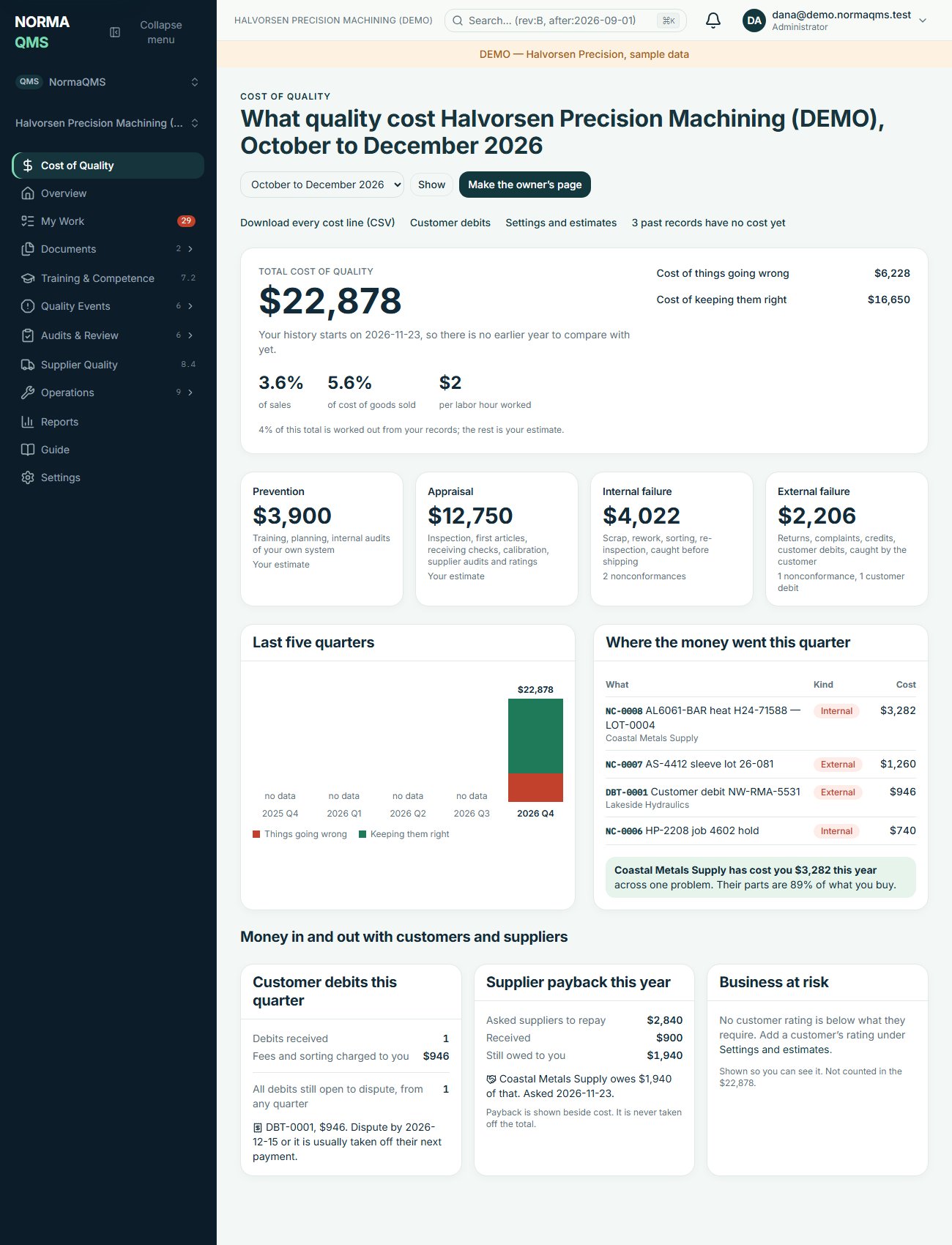
The page groups them as Cost of things going wrong (internal and external failure) and Cost of keeping them right (prevention and appraisal).
Norma assigns the failure category from the record; nobody picks it. A nonconformance with the detection point Customer is external failure; any other detection point is internal failure. A complaint and a customer debit are external failure. A containment campaign is external failure when any nonconformance linked to it was found by the customer, and internal failure otherwise. Each record's cost section says which and why, for example Norma counts this as internal failure because it was found before the parts shipped.
Every line is marked From records or Your estimate. From records lines are worked out by Norma from production records (below), and a customer debit with the customer's debit memo attached is from records. Every typed cost line is Your estimate, and so is a customer debit without its memo. Prevention and appraisal are always estimates in this release; until you enter them the page reads not entered. A box left empty is never counted as zero. The page states how much of the total is worked out from records, for example 62% of this total is worked out from your records; the rest is your estimate.
A cost counts in the quarter of the record it sits on: the day the nonconformance or complaint was raised, the day the containment campaign was created, or the day the debit was received, in your organization's time zone. Quarters are calendar quarters.
Read the Cost of Quality page
Choose the quarter in the period list and select Show. The page shows, for that quarter:
- Total cost of quality, with the change from the same quarter a year earlier. When prevention and appraisal were entered for one of the two quarters but not the other, the totals are not like for like, so only failure cost is compared and the sentence says so. For a quarter that ends before your first cost line or customer debit, failure cost reads no data, never $0, and no comparison is made; the page names the day your history starts.
- The yardsticks: the total as a share of sales, as a share of cost of goods sold, and per labor hour worked. Enter each base for the quarter under Settings and estimates. In a NormaMES organization, sales come from issued invoices and labor hours from logged labor sessions when you have not typed them; cost of goods sold is always typed. A yardstick with no base is left out.
- The four category cards, each with its change on the year earlier. A falling failure figure shows as good news; a change in prevention or appraisal is shown without judgment.
- Last five quarters: a bar per quarter split between things going wrong and keeping them right.
- Where the money went this quarter: the costliest events with their category. A complaint, its nonconformance, its containment campaign and a customer debit linked to them are one event, and each dollar is counted once. When one supplier's problems cost the most this year, the card names the supplier and, in a NormaMES organization, their share of what you buy.
- Money in and out with customers and suppliers: customer debits this quarter, supplier payback this year, and Business at risk.
Norma compares the shop only with its own past. It does not compare your shop with other companies and quotes no outside figure.
Download every cost line (CSV) exports every live cost line and customer debit. The link that counts past records with no cost yet opens the catch-up list (below).
Record cost on a nonconformance, complaint or containment campaign
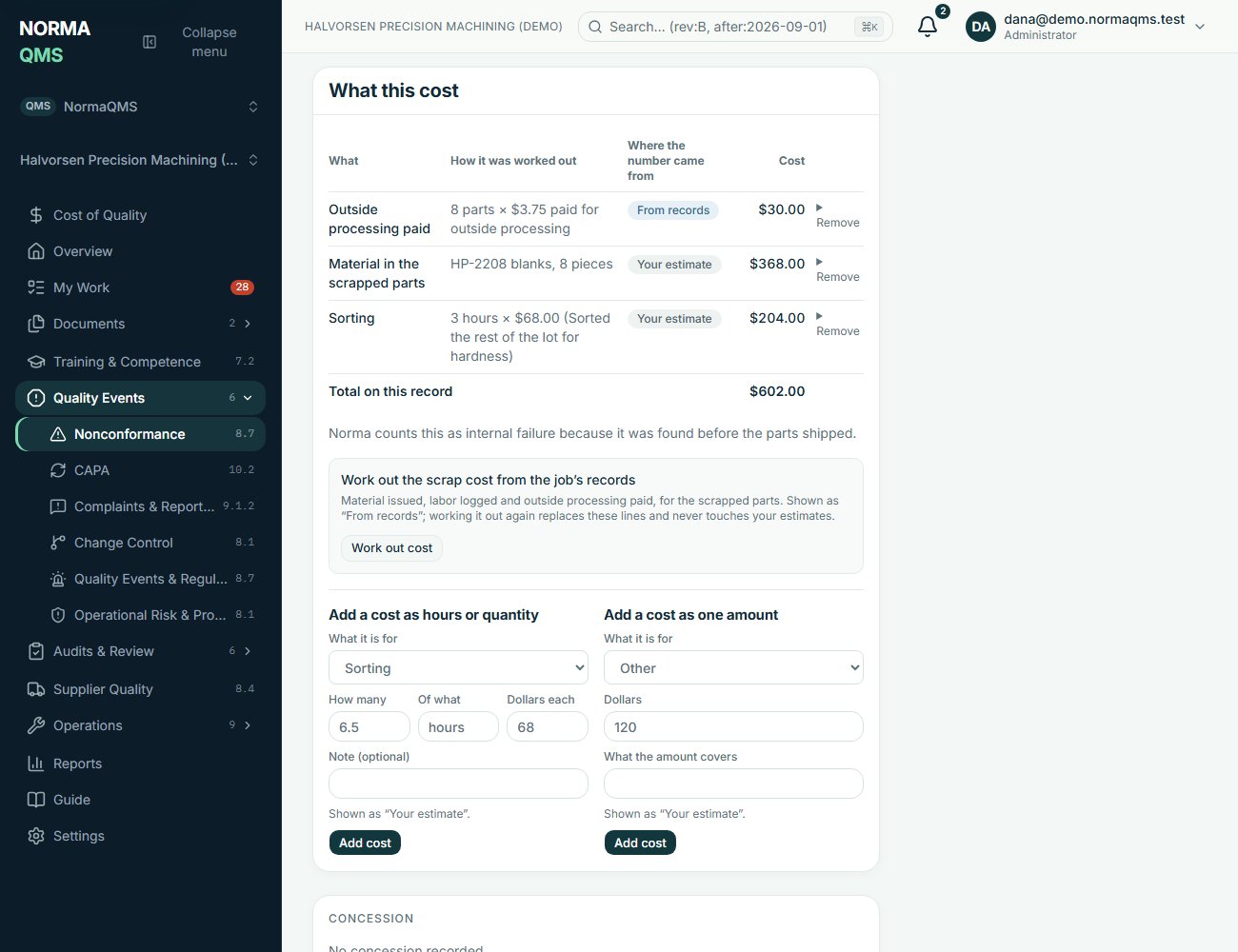
Open the record and go to What this cost. Each line shows what it is for, how it was worked out, whether it is from records or your estimate, and the cost. Total on this record is the sum.
To type a cost:
- Under Add a cost as hours or quantity, choose What it is for (for example Sorting, Rework time, Re-inspection or Freight), enter How many, Of what and Dollars each, and select Add cost. When you enter hours, Dollars each starts at the quality labor rate from Settings and estimates.
- Or, under Add a cost as one amount, choose what it is for, enter Dollars and What the amount covers, and select Add cost.
A line is never edited or deleted. To correct one, select Remove beside it, state Why is it being removed?, select Remove line, and add the corrected line. Norma keeps the removed line, marked as removed, with the reason; it no longer appears in the section or the totals. The record's chain shows that a line was removed and which element it was, never the amount. Lines can be added to an open, closed or reopened record; they are not part of the record's controlled content.
When a customer debit is linked to the record, its charges appear in the section read-only, marked Counted on the debit, not here. If you type a Sorting, Rework time, Freight or Credit to the customer line on a record with a linked debit, Norma adds it and warns: Check it is not already on customer debit DBT-…, which is linked to this record. Enter each cost once, on the record where it was incurred.
A CAPA carries no cost of its own. Its page shows Cost of the records this came from, read-only, with a link to each source.
Work out scrap cost from production records
In an organization with NormaMES, every nonconformance offers Work out cost (Work out the scrap cost from the job's records) to a Quality Manager or administrator, and a scrap disposition, or a split disposition with a scrap outcome, runs the same work-out in the same step. If the nonconformance is tied to more than one job, choose Which job first; if it is tied to none, the work-out says so and adds nothing. Norma adds up to three lines, all From records, only those it can work out:
| Line | How it is worked out |
|---|---|
| Material in the scrapped parts | Quantity scrapped × the job's material quantity per part × the price of the lots issued to the job, weighted by quantity |
| Machine and labor time already in them | For each operation finished before the nonconformance was raised: person-hours at the work center labor rate and operation hours at the burden rate, at the rates in force on the day, shared over every piece through the operation (good, scrap and rework). Scrapped parts never carry more than all of an operation's cost |
| Outside processing paid | Quantity scrapped × what the outside-process purchase order line paid, from issued, part received or closed purchase orders only |
The working is shown on each line. Where something is missing, Norma names it and adds nothing for that part: no job, a scrap quantity written as text, no material issued, a lot with no purchase price, a work center with no rate for the days worked, no labor logged, or no pieces recorded through an operation. Add that part as an estimate. Working it out again replaces the earlier worked-out lines and never touches your estimates.
Rework, sorting and re-inspection time are always typed estimates: Norma has no record of time spent fixing parts. Organizations without NormaMES type every line.
Record a customer debit
A customer debit is what a customer charged the shop for a rejection: a fee per rejection report, sorting, rework, freight. Many customers take it off the next payment unless the supplier disputes in time.
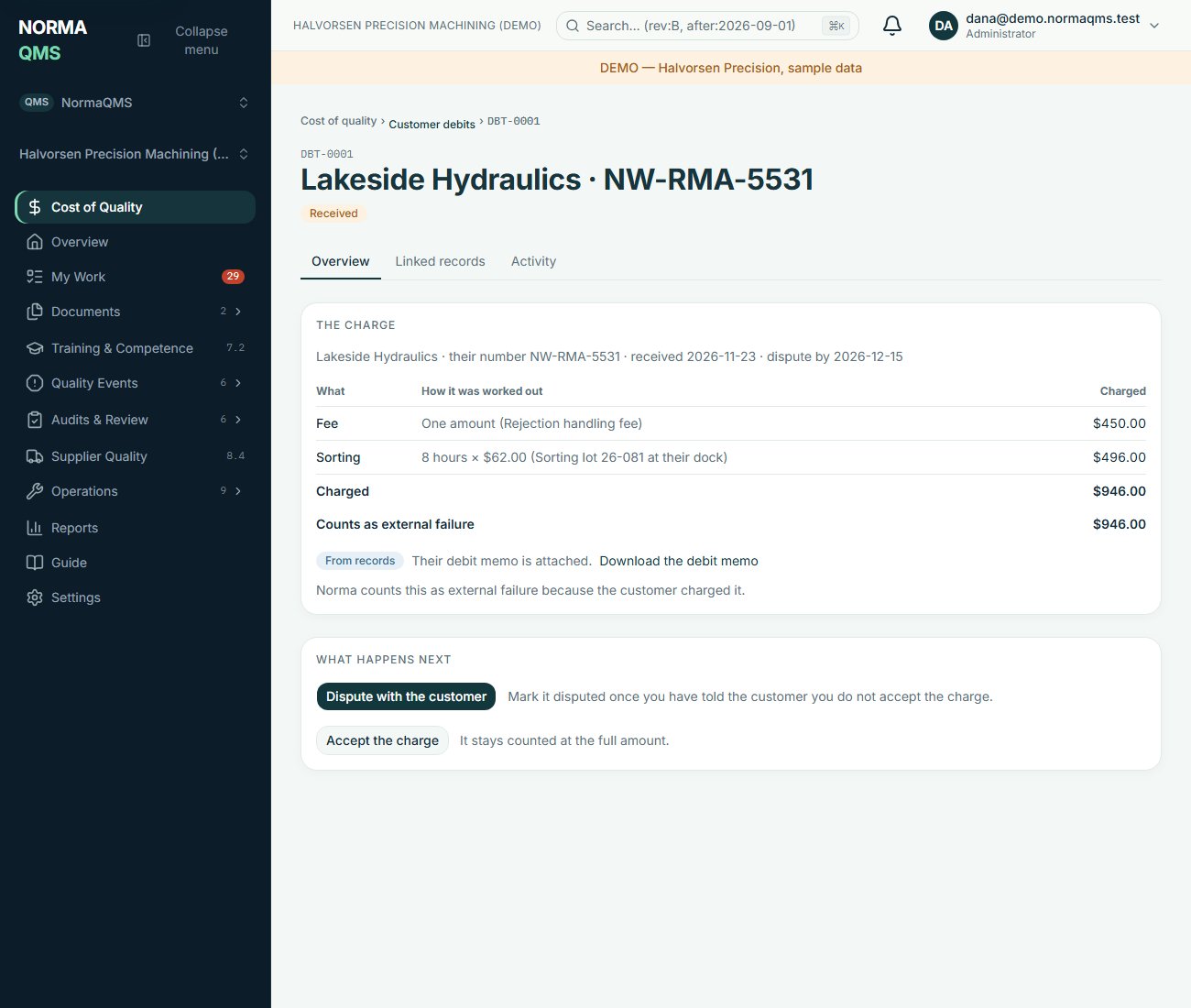
- Open Cost of Quality > Customer debits. Under Record a customer debit, choose the Customer (add the customer under Customer & Contract Quality first if needed) and enter Their rejection number, Received on and, optionally, Dispute by.
- Optionally choose Linked to, the nonconformance or complaint it concerns, and attach Their debit memo. With the memo attached the debit counts From records; without it, Your estimate.
- Under What they charged, fill a row for each charge as hours and a rate per hour, or as one amount, with a note. Select Record debit. The debit receives a DBT reference.
On the debit, select Dispute with the customer once you have told the customer you do not accept the charge, or Accept the charge. A disputed debit ends as Customer upheld the charge or Customer reversed it, with the amount reversed (up to the amount charged). The debit counts as external failure at the amount charged less the amount reversed. The memo downloads from the debit with Download the debit memo.
A debit still Received appears in My Work for the Quality Manager and administrators from 7 days before its dispute-by date (Dispute or accept DBT-…), and is marked overdue once the date has passed. The register shows passed beside a dispute-by date that has gone by.
Ask a supplier for payback
On a nonconformance with a supplier, What this cost includes Getting it back from {supplier}.
- Under Ask {supplier} to repay, enter Dollars asked, Asked on and optionally what it covers, and select Ask for payback. The claim receives an SCL reference. A nonconformance carries one claim; another can be asked only after the earlier one is written off.
- When money, a credit or replacement parts come back, record Dollars, Received on and How (Credit, Payment or Replacement parts) and select Record payback. The claim reads Open, Part paid or Paid.
- If the remainder will not be recovered, open Give up on what is still owed, state why, and select Write off.
Payback is shown beside the cost and is never subtracted from it, even once received: the cost on the record stays at its full amount. A claim with nothing received 30 days after it was asked appears in My Work as Follow up on SCL-…. The supplier's page shows Cost and payback: the cost their nonconformances caused and what is still owed.
Settings and estimates
Cost of Quality > Settings and estimates (Quality Manager or administrator) holds the figures Norma cannot find in your records. Everything typed here is shown as Your estimate.
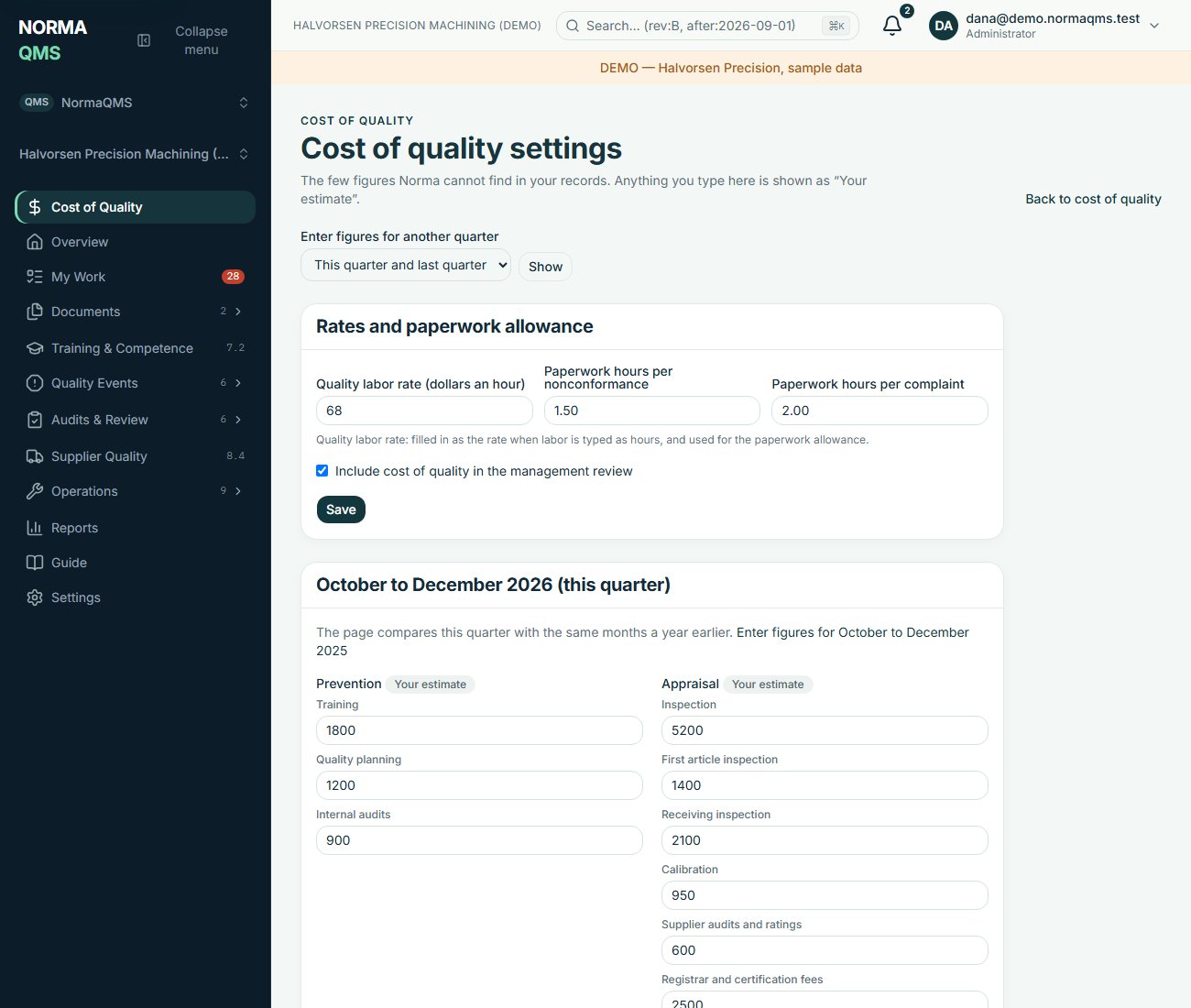
- Quality labor rate (dollars an hour): the default rate when labor is typed as hours, and the rate for the paperwork allowance.
- Paperwork hours per nonconformance and Paperwork hours per complaint: when set, with a quality labor rate, Norma adds one estimate line when such a record is closed, for example 2.00 hours × $60.00 (standard allowance). Only records closed after the allowance was set receive it, and a record that already has a paperwork line, or is reopened and closed again, does not receive a second one.
- Include cost of quality in the management review: on by default (see below).
- For each quarter: the prevention items, the appraisal items, one further item of your own under either, and What cost is measured against (sales for the quarter, cost of goods sold, labor hours worked). Select Save with the quarter's name. Remove a figure with Clear; an empty box is not a zero.
The page opens on this quarter and last quarter. Use Enter figures for another quarter to enter an earlier one, for example the same quarter a year earlier so that its prevention and appraisal can be compared.
Customer scorecard entries record what a customer rates your quality at beside the rating they require, as of a date, with optional sales to them over the last 12 months. The latest entry for each customer counts. A customer below the rating they require is listed under Business at risk on the Cost of Quality page. Business at risk is shown for information and is never added to the total.
Cost past records
Records raised before you started using cost of quality have no cost lines. The link {n} past records have no cost yet lists, newest first, the nonconformances that are dispositioned or closed, the complaints that are closed and the containment campaigns that are closed or awaiting their effectiveness check, where none carries a live cost line. Open one and add what it cost, or work it out from production records. It counts in the quarter it was raised and leaves the list as soon as it has a line.
Issue the owner's page and use it in management review
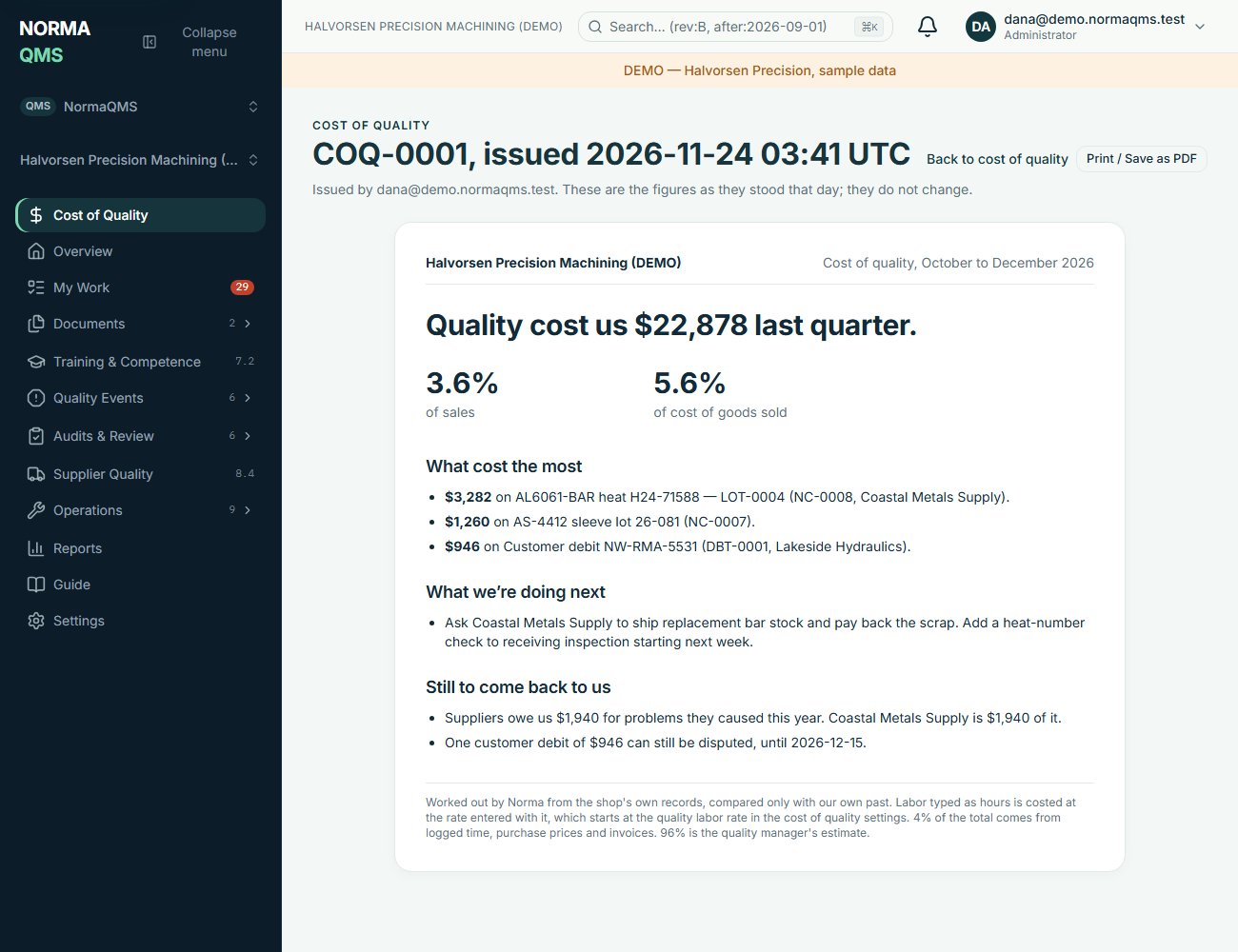
- On the Cost of Quality page, select Make the owner's page. It shows the quarter as one sheet with today's figures.
- Under What we're doing next, write the next steps, one per line (up to 1,200 characters).
- Select Issue the owner's page. Norma stores a copy that never changes, numbered COQ-…, with who issued it and when. Print it or save it as PDF from the issued page.
A quarter with nothing recorded cannot be issued. Cost lines added later do not change an issued page. When the quarter's live total no longer matches the total on the latest page issued for it, the Cost of Quality page says Changed since COQ-… was issued.
With Include cost of quality in the management review on, a management review carries a cost of quality input for the last full quarter before the review date, worded as the owner's page and marked as covering the whole organization, because cost lines carry no unit. It is frozen with the other inputs when the review is closed. Only Cost of Quality readers see it; for everyone else, auditors included, it is absent. Turn the setting off if dollar figures should not appear in your management review records.
In the user guide
This article is chapter 45, "Cost of Quality", of the NormaQMS User Guide (NORMA-UG-001), which is under Help > User guide. Chapter numbers in the text refer to that guide.