Modules · For the quality manager
Internal audits, findings, and the audit program
How the work moves
Internal audit- 1Plan
- 2Run audit
- 3Record findings
- 4Follow through and close
Open: Audits. Typical leads: Internal Auditor and Quality Manager. Purpose: schedule and conduct audits, retain findings, and track follow-up.
Schedule and start
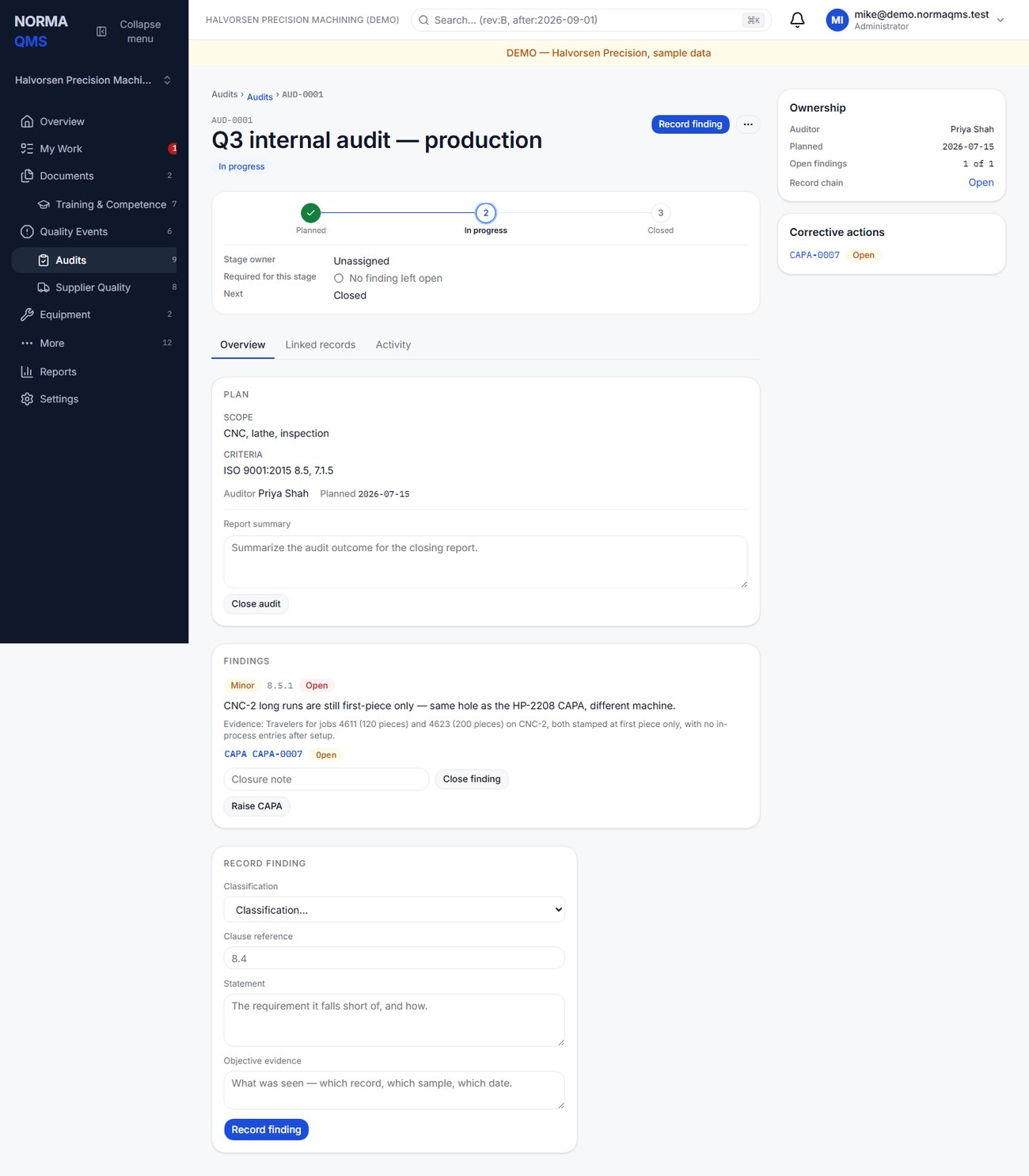
- Choose Schedule audit and enter title, scope, criteria, auditor, and planned date.
- Select an auditor from the organization's People list. Confirm that the person is available and appropriate for the assignment.
- Review the Planned audit and use Start audit to move it to In progress when the audit begins.
- Use the criteria and scope to select records and activities. Retain the evidence references in the findings or report summary.
Record findings
During the audit's In progress state, use Record finding with its four required fields: Classification (Major, Minor, Observation, or Opportunity), Clause reference, Statement — the requirement it falls short of, and how — and Objective evidence — what was seen — which record, which sample, which date.
Raise a CAPA from a finding when corrective action is needed. The link is retained on the audit and CAPA histories. Close a finding with notes explaining the resolution and evidence. A finding may be closed after the audit itself is closed; it has its own follow-up life.
Close the audit
An audit must be started before it can be closed. Enter the Report summary that identifies what was covered, the conclusion, and outstanding matters. While findings remain open the lifecycle rail reads No finding left open and the header's primary action becomes Close open findings; the audit can nevertheless be closed with findings open, and the closure records how many were open. Those findings still require follow-up.
The controlled Close with no findings option, where shown, requires an In progress audit, no still-open finding, and a written note. Do not use the wording to disguise unresolved findings. A permitted reopen requires a reason and retains the earlier closure in history.
Use the audit evidence
Open the audit's Activity and Record chain to show planning, start, findings, CAPA links, and closure. Use Reports to review audit finding closure and the register to identify open findings.
The Internal Auditor functional role supports the audit program; it is different from a read-only external auditor's Audit Room. It does not by itself grant document approval, NC disposition, or CAPA effectiveness closure. Combining roles can broaden a person's authority, so preserve the independence required by your own audit procedure when making assignments.
Tip: Write findings so the CAPA can be raised from them without a second conversation: the criterion, the evidence you saw, and the gap between them, each as its own sentence. "WI-2208 Rev E requires an in-process bore check every 10 pieces; job 4590's inspection entries show none between piece 1 and piece 40" is a finding. "Inspection not followed" is not.
Completion check: the audit summary is retained, each finding has a status, outstanding work has an owner through the appropriate follow-up records, and the audit closure is not being mistaken for closure of every finding.
In the user guide
This article is chapter 26, "Audits and Findings", of the NormaQMS User Guide (NORMA-UG-001), which is under Help > User guide. Chapter numbers in the text refer to that guide.