Modules · For the quality manager
Change control
How the work moves
Controlled change- 1Request
- 2Assess impact
- 3Approve and implement
- 4Verify
Open: Quality Events > Change Control. Typical proposers: Quality Manager, Engineer, and Department Manager. Decision authority: Quality Manager or administrator.
Propose the change
Create a CC record with title, change type, urgency, problem or opportunity, reason, proposed state, requester, and sponsor. Types cover QMS, process, product, supplier, equipment, software, facility, regulatory, and temporary changes. Urgency can be Routine, Urgent, or Emergency.
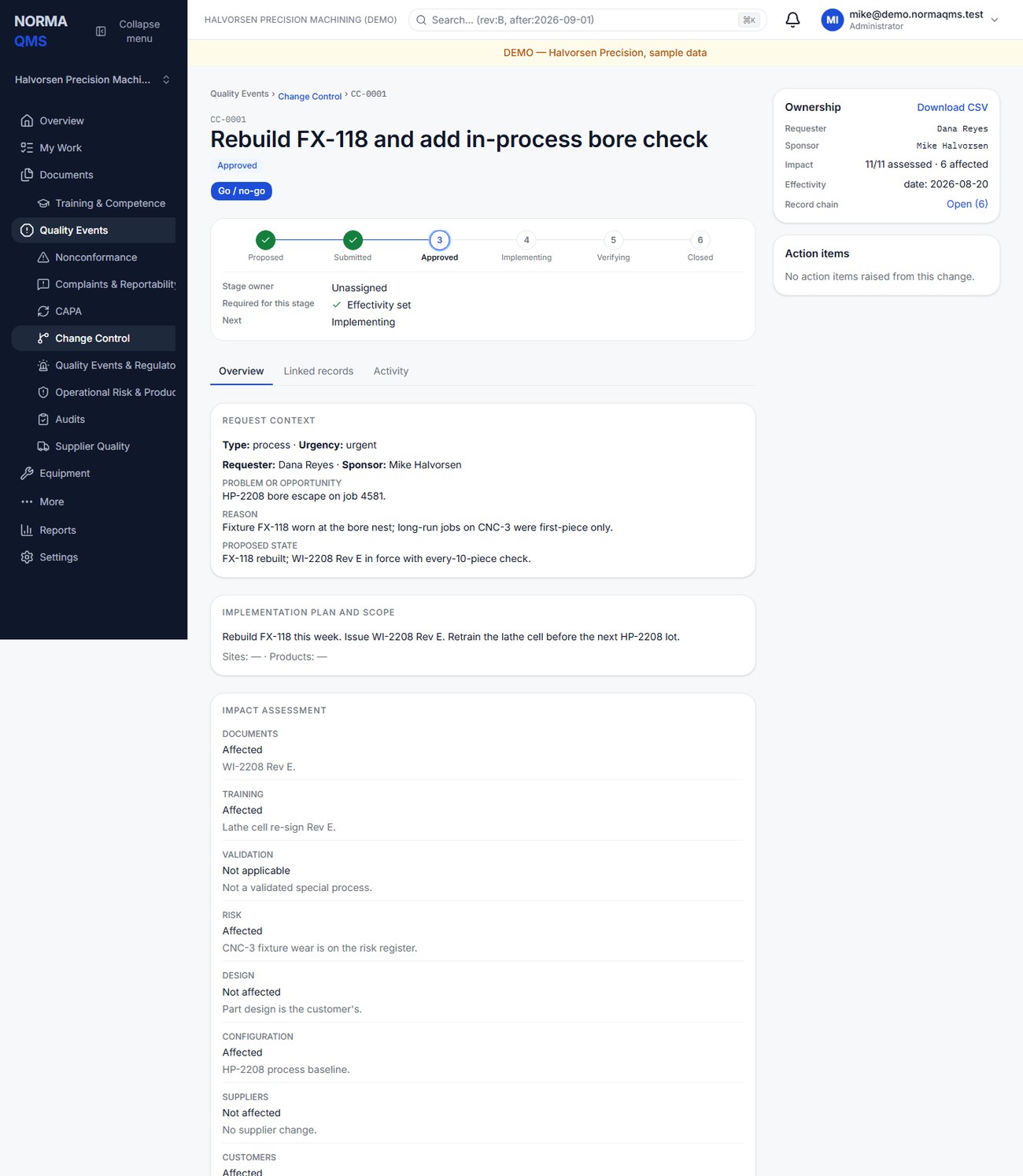
For a temporary change, record its expiry and the plan for restoring or replacing the temporary condition. An emergency classification does not remove the approval and verification gates.
Complete impact and effectivity
For each impact domain, select Affected, Not affected, or Not applicable and write a note. All domains need an answer and note, including those you conclude are unaffected.
| Impact domains | Consider |
|---|---|
| Documents and training | Procedures, drawings, instructions, forms, reading, and qualification |
| Validation and risk | Revalidation, test evidence, risk assessment, and residual issues |
| Design and configuration | Released design outputs and approved baselines |
| Suppliers and customers | Changed purchasing requirements, approvals, and communications |
| Inventory and work in progress | Affected lots, existing stock, rework, segregation, and transition |
| Regulatory and business continuity | Applicable notifications and ability to sustain operations |
Write the plan under Implementation plan and scope and choose Save plan; save the impact answers with Save impact assessment. Set effectivity using the offered basis: Date, Lot, Serial, Work order, Site, or Baseline, provide the value, and choose Save effectivity. A date without an implementation plan or unanswered impact domains will not satisfy the gate.
Work the lifecycle
- Save the Draft and inspect the missing-information list.
- Choose Submit for quality review.
- Under Quality decision, an authorized user chooses Approve or Reject with the required note.
- An approved change then passes the Implementation gate: Go — begin implementation or No-go. Record what was done while Implementing.
- When implementation is ready to evaluate, the change moves to Verifying.
- Under Verification, choose Verify effective to close, or Not effective to return the change for further work.
The normal path is Draft, Submitted, Approved, Implementing, Verifying, Closed. Rejected, Deferred, Cancelled, and Closed are terminal states; Deferred and Cancelled appear in the register's status list, but this edition offers no control on the record page that reaches them, so a proposal you will not pursue is left Rejected with its reason, and a proposal reconsidered later is a new request.
Expired temporary changes remain visible as work until resolved. Changing the status does not automatically update external work orders, equipment, inventory, or every document. Verify that each affected record and physical control has been updated before closing.
In the user guide
This article is chapter 18, "Change Control", of the NormaQMS User Guide (NORMA-UG-001), which is under Help > User guide. Chapter numbers in the text refer to that guide.