Modules · For the quality manager
Design and development
How the work moves
Design project- 1Plan
- 2Define inputs
- 3Produce and verify outputs
- 4Validate and release
Open: More > Design & Development. Typical preparer: Engineer or Quality Manager. Release authority: Quality Manager or administrator.
Build a design project
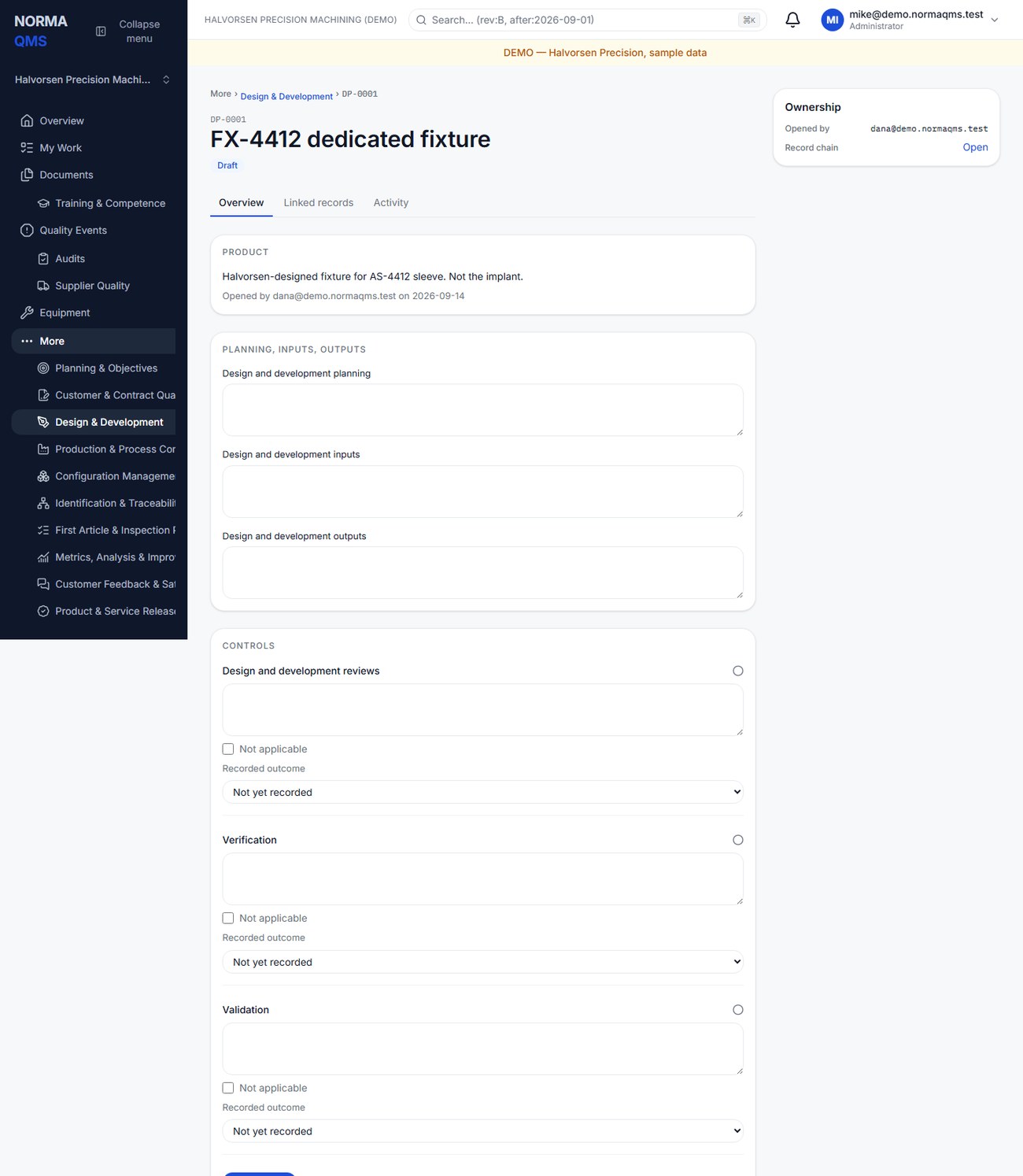
- Open a project with a title and product description. Norma assigns a DP reference.
- Record the design and development plan: responsibilities, stages, review points, and the evidence to be produced.
- Record inputs: the requirements and constraints the design must meet.
- Record outputs: the drawings, specifications, software, instructions, or other deliverables defining the result.
- Address design reviews, verification, and validation. Each control accepts explanatory text or an explicit Not applicable selection.
- Choose Save project. Review all fields together before submission so related information is preserved consistently.
- The authorized user selects Release when the checklist is complete and the technical evidence supports the decision.
Understand the three controls
| Control | Practical question |
|---|---|
| Review | Have the relevant people examined progress, suitability, and issues? |
| Verification | What evidence compares design outputs with the specified inputs? |
| Validation | What evidence addresses the product's intended use under the conditions you evaluated? |
Use evidence references and dates. For example, identify the test report and reviewed revision rather than writing only “test completed.” An N/A checkbox is a recorded selection, not permission to omit work required by your own applicable requirements.
After release
The released project is no longer an editable draft. Use Record change to describe a design change after release. The app retains that entry with actor and date. Coordinate controlled execution through Change Control where needed and update the authoritative drawings, configuration baseline, inspection plan, and product index separately.
The design module retains a structured design record; it does not replace CAD, simulation, test execution, or your technical approval process. If your shop builds entirely to customer drawings, resolve design applicability in the signed scope rather than assuming that a hidden or unused module establishes an exclusion.
Completion check: plan, inputs, outputs, reviews, verification, and validation are addressed; evidence references identify the released configuration; Release attribution is present.
In the user guide
This article is chapter 17, "Design and Development", of the NormaQMS User Guide (NORMA-UG-001), which is under Help > User guide. Chapter numbers in the text refer to that guide.