Modules · For the quality manager
Configuration management
How the work moves
Configuration- 1Define item
- 2Create baseline
- 3Control changes
- 4Preserve history
Open: More > Configuration Management. Typical leads: Engineer and Quality Manager. Purpose: identify the controlled item and its approved definition at a given revision or baseline.
Create and maintain an item
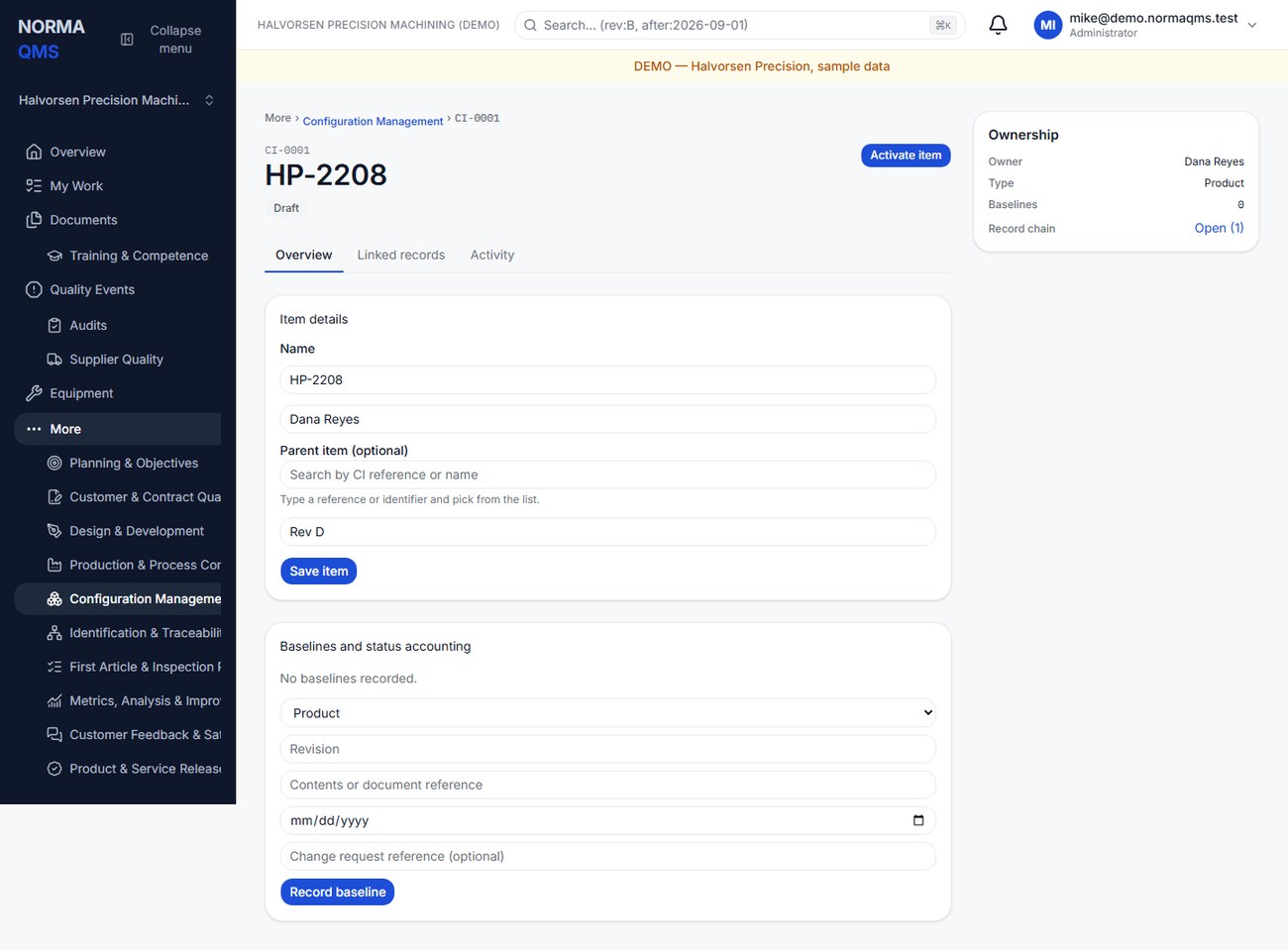
- Create an item with name, type, and owner. Types are Product, Component, Process, Document, and Software.
- Enter the source-system reference and, optionally, pick a parent item by typing its CI reference or name and choosing it from the list.
- Save the Draft details and review the item's relationship to its authoritative drawings or specifications.
- Use Activate item when the item is ready to serve as an active configuration record.
- Use Obsolete item when it is withdrawn. Obsolete is terminal and does not delete its baseline history.
Record and approve a baseline
On the item, choose the baseline type: Functional, Allocated, Product, Manufacturing, or Customer. Enter revision, contents or document reference, effective-from date, and optional change-request reference. Select Record baseline.
Review the proposed baseline before choosing Approve baseline. Approval requires a contents reference and effective date. The approved baseline retains the definition you declared; a later source-document change should be handled as another controlled baseline, not assumed to rewrite the older one.
Example: a product baseline identifies BKT-204 drawing Rev C, the material specification, and the inspection-plan reference. A manufacturing baseline can identify the released work instruction and process specification used to build it.
Check the complete definition
The item lifecycle and baseline lifecycle are separate. Active item status is not proof that every required baseline has been approved. Review the baseline list, revision, status, contents reference, and effective date. Baseline states can include Draft, Approved, and Superseded.
Configuration Management records the quality definition and status accounting. Store the authoritative files in Document Control or the appropriate engineering system, then maintain precise references. The module does not import or synchronize CAD changes automatically.
Completion check: the intended item is Active, the needed baseline is Approved, references identify actual revisions, and change-control references explain the transition where relevant.
In the user guide
This article is chapter 22, "Configuration Management", of the NormaQMS User Guide (NORMA-UG-001), which is under Help > User guide. Chapter numbers in the text refer to that guide.