Modules · For everyone on the floor
Production and process control
How the work moves
Production record- 1Plan the job
- 2Run controlled operations
- 3Record inspection
- 4Mark ready for release
Open: More > Production & Process Control. Typical preparers: Quality Manager, Department Manager, and QA Technician. Release authority: Quality Manager or administrator.
Establish controlled conditions
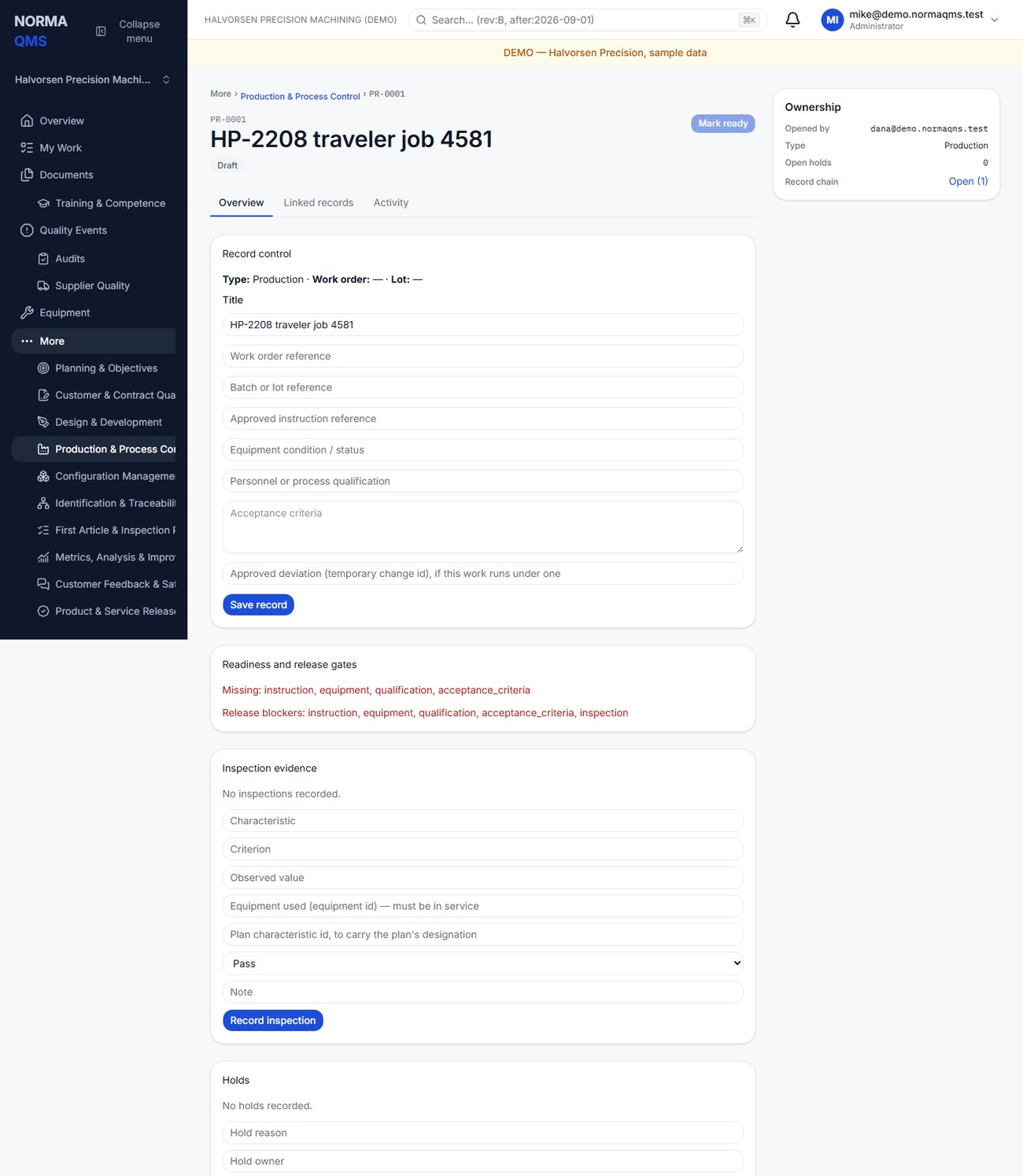
- Create a record with title and type: Production, Service, Special process, or Inspection. A record opened by Traveler at job release arrives already titled and filled from the router (chapter 20).
- In Draft, enter work-order and batch or lot references. If the work runs under an approved temporary change, enter it as the Approved deviation; the record then reads Runs under deviation …; checked at every step and at release.
- Record the approved instruction reference, equipment condition or status, personnel or process qualification, and acceptance criteria.
- Save the record. The Readiness and release gates card lists what is still Missing and the current Release blockers, as field keys such as
instructionorfailed_inspection; the four controlled-condition fields are required for readiness. - Select Mark ready, then Start production when the work begins.
Describe the actual controls for this work. A text statement about calibration does not automatically check an equipment relationship; use a precise asset reference and confirm the equipment record yourself.
Record inspection evidence
Enter the characteristic, criterion, observed value, the Equipment used (which must be in service), optionally the plan characteristic it carries the designation of, the result, and a note. Results are Pass, Fail, or N/A. Use Record inspection and confirm the new entry. Include units and acceptance limits in the criterion and observed value so another person can interpret the result.
For example: characteristic “Hole diameter 1,” criterion “10.00 ±0.05 mm,” observed value “10.08 mm,” result Fail. Record what was measured, not merely “bad hole.”
Manage holds
Use Open hold with a reason and owner when work must be controlled. Resolve a hold with a note describing the resolution evidence. An open hold blocks release. A failed inspection does not automatically create a hold, and opening a hold entry should not be assumed to change every status or stop a machine.
Do not confuse the hold list with the overall lifecycle state. Follow the offered status controls and your shop's physical segregation or stop-work process. Record containment in an NC where appropriate.
Release the production record
After work, choose Submit for release. Release requires all readiness information, at least one inspection, no uncovered failed inspection, and no open holds. The quality manager then selects Release record, which stays disabled until the gate passes.
A Fail is never edited or erased, and adding a passing entry does not clear it. It is covered when a nonconformance has been raised from that inspection row and that nonconformance is Closed; the row then reads Covered. Until then the row reads No nonconformance raised — release is blocked until one is raised and closed, and the Readiness and release gates card lists each uncovered failure with its characteristic and the linked NC's reference and status. Use Raise NC on the failed row to open the linked nonconformance, disposition and close it under chapter 24, and the release gate clears on its own. A job run through Traveler reaches the same place from the tablet: a failed characteristic there needs a nonconformance before the operation completes (chapter 21).
Example: Hole 1 on job 4590 measures 10.08 mm against 10.00 ±0.05 — Fail. The technician chooses Raise NC on that row; the NC is dispositioned Rework, the parts are re-machined and re-inspected, the verification is recorded, and the quality manager closes the NC. Back on the production record the row now reads Covered and Release record is enabled. The Fail is still there, with the NC beside it — which is exactly what the customer's source inspector will ask to see.
The normal lifecycle is Draft, Ready, In process, Awaiting release, Released, with Held and Cancelled branches where supported. Released and Cancelled are terminal. Release of this record shows completion under controlled conditions. Product & Service Release is the separate authorization to release the product or service to the customer.
In the user guide
This article is chapter 19, "Production and Process Control", of the NormaQMS User Guide (NORMA-UG-001), which is under Help > User guide. Chapter numbers in the text refer to that guide.