Modules · For the quality manager
Supplier quality and the approved supplier list
How the work moves
Supplier control- 1Evaluate
- 2Approve for scope
- 3Monitor
- 4Re-evaluate
Open: Suppliers. Typical leads: Quality Manager and Purchasing. Purpose: maintain supplier approval status, evaluation evidence, corrective-action connections, documents, and communicated requirements.
Register and approve a supplier
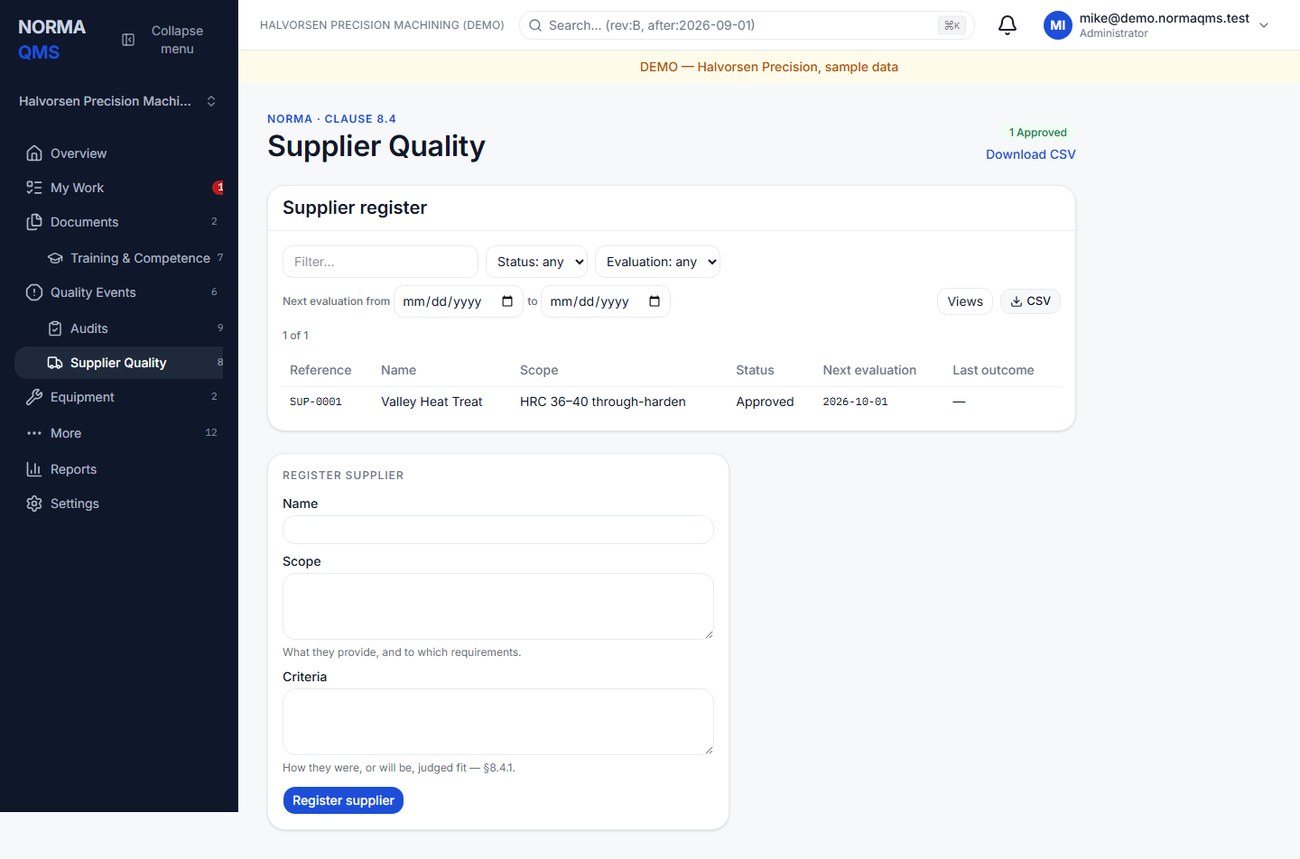
- Search the approved supplier list before adding a company.
- Enter supplier name, scope of supply, and evaluation or acceptance criteria. These are required.
- Submit the supplier record and note its SUP reference. It starts Pending.
- Review your approval evidence, then choose Approve supplier and provide the requested dates.
- Confirm Approved status and the next evaluation date. Retain the relevant certificate or evaluation evidence through the available evidence controls.
Scope should identify what the supplier is approved to provide. “Heat treatment of BKT-204 to specification HT-12” is more useful than “vendor.” Criteria should explain how approval and reevaluation are judged.
Evaluate reevaluate suspend and reinstate
Record an evaluation with outcome, summary, next-due date, and file if the form offers it. Include the reviewed period and evidence, such as delivery, nonconformance history, certification, or audit results. Pending suppliers cannot be evaluated through the normal evaluation workflow; approved and suspended suppliers can.
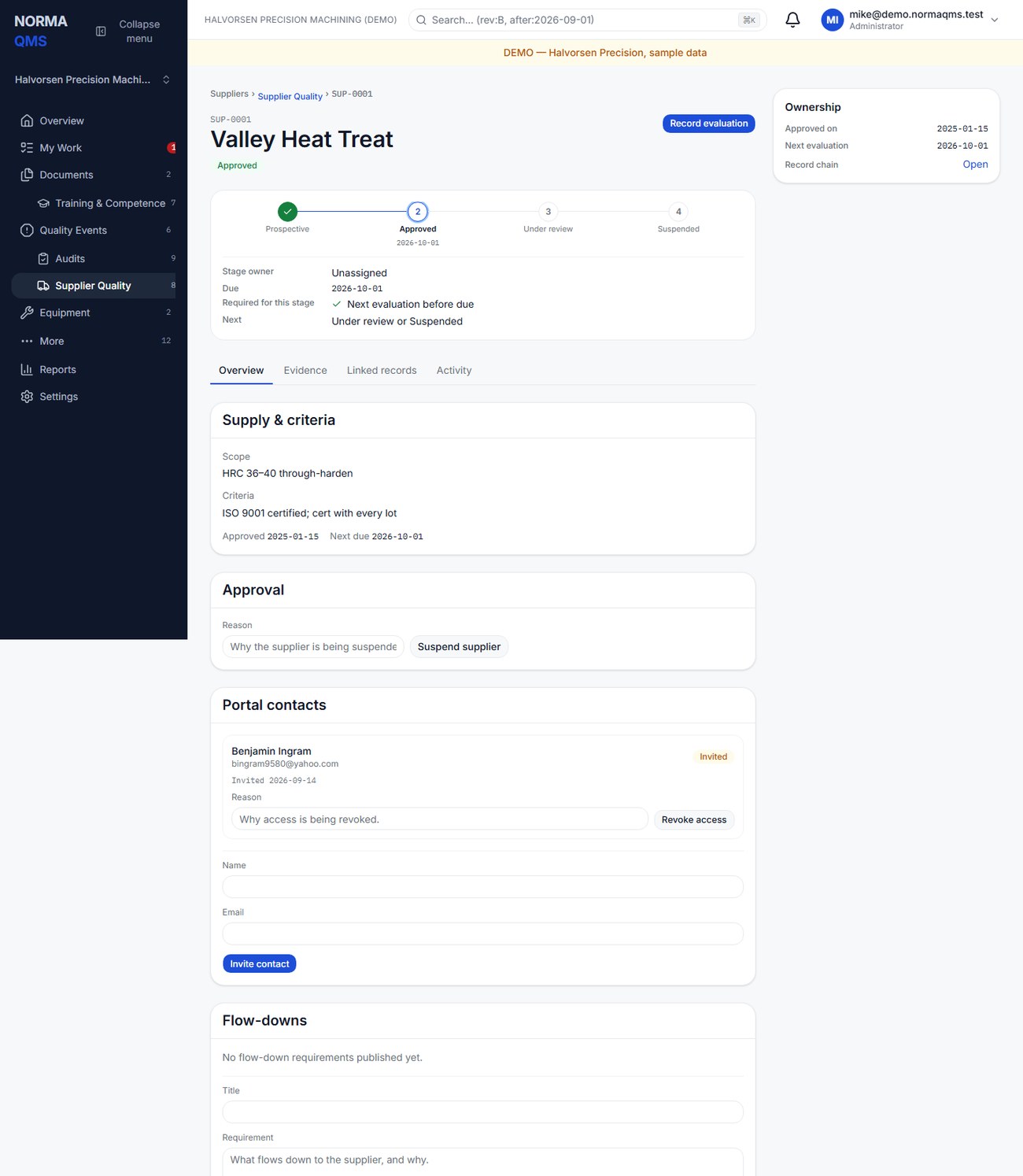
An approved supplier becomes overdue when its next evaluation date passes. Recording a new evaluation with a future date clears that overdue condition on the next read. Changing status alone is not a substitute for an evaluation.
Use Suspend supplier with a reason when approval is suspended. Use Reinstate supplier with a note when justified. The path is Pending to Approved, Approved to Suspended, then Suspended to Approved. The history of the suspension remains.
Connect quality problems
Raise a CAPA from the supplier when corrective action is required. A supplier may have several related CAPAs over time; each CAPA retains its own source relationship. NC intake can select a supplier and creates a corresponding supplier-chain entry. Review both the CAPA list and nonconformance list when reevaluating performance.
Contacts flow downs and documents
The supplier page includes Portal contacts, Flow-downs, Evaluations, Corrective action, and Nonconformances where available. Use the Evidence tab to inspect submitted supplier documents. Contact invitations and revocations control access to that supplier's portal; they do not create internal company members.
To communicate a requirement, publish a flow-down with a title and the actual requirement or instruction. Review acknowledgments before treating it as received. A signed acknowledgment shows that the contact acknowledged the communication; it is not automatically a supplier approval or proof of implementation.
Chapter 36 explains the contact's workflow and internal acceptance or return of supplier responses.
Completion check: the supplier has the intended status, approved scope, next evaluation date, supporting evaluation evidence, and any required response or acknowledgment follow-up.
In the user guide
This article is chapter 14, "Supplier Quality", of the NormaQMS User Guide (NORMA-UG-001), which is under Help > User guide. Chapter numbers in the text refer to that guide.